PROdb Security and Infrastructure Details
Datacenter, encryption, compliance, and security policy configuration
On this page 4
eSolia's Partner Foresoft
eSolia has been a business partner of Foresoft since 2010. Foresoft is a trustworthy partner and service provider, with little unplanned downtime: monthly uptime averaged about 99.9% over the two years to October 2026 (status page).
Foresoft states that it has completed PCI compliance with VikingCloud. See details on Foresoft's Security and Stability page.
Infrastructure
The datacenter housing PROdb is operated by Digital Realty at 350 East Cermak Road, Chicago, USA. Foresoft states that the facility holds SOC 2, SOC 3, PCI-DSS and ISO 27001 certifications, with 24x7 security personnel, biometric and photo badge access, and CCTV. Digital Realty lists N+1 redundancy for UPS and cooling.
For clients who prefer non-US hosting, Foresoft also offers the platform on Microsoft Azure's West EU datacenter in the Netherlands. A fee-based private cloud option on Azure is available, providing access to virtual device logs.
Application Security
- Data encrypted over the wire via 256-bit (SHA2) TLS certificate, using TLS 1.2
- Database and all file attachments encrypted using AES256
- Servers run fully-patched Windows Server 2022 with Microsoft SQL Server 2022 Enterprise Edition
- Microsoft patches and hotfixes installed weekly; critical updates installed immediately
- Monthly vulnerability scans through VikingCloud PCI Manager
Security Policy Controls
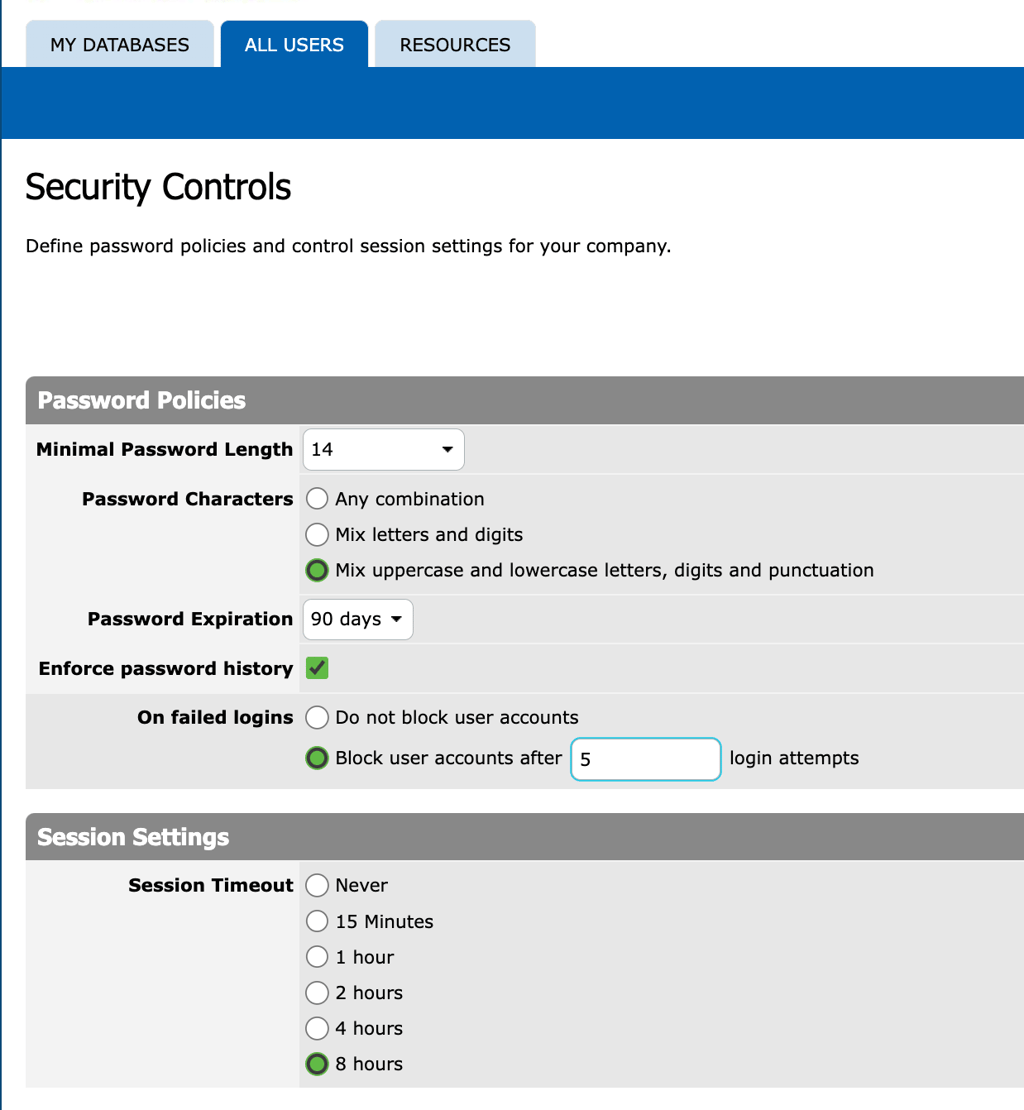
For PROdb enterprise subscribers with a custom domain, security policies can be configured from the "All Users" section via the "Security Controls" button.
Password Complexity
Both length and allowed-character policy changes take effect on the next account password expiration.
The minimum password length can be customized beyond the default UI maximum — for example, to 12 or 14 characters. Enterprise subscribers should contact us for customization.
Password Expiration
Password expiration timeout changes take effect immediately. PROdb tracks the date of the last password change and calculates expiration dynamically.
A password change can be forced by finding the user in the All Users list and setting the "Must Change Password" flag.
Password History
Selecting "Enforce password history" prevents re-use of any previously set passwords.
Failed Sign-ins
Failed sign-in counter changes take effect on the next failed attempt. When failures reach the configured maximum, the account is locked. A successful sign-in or password reset clears the counter.
Locked accounts can be unlocked from the All Users list.
Session Timeout
When a PROdb user signs in, an authorization ticket is created. Changes to session timeout policy are not reflected in existing tickets until they expire or the user logs out and back in.
Setting any timeout value other than "Never" creates a session cookie (and hides the "Keep me logged in" checkbox). The session cookie expires:
- When specified by the policy (maximum 8 hours)
- When the user closes all browser windows with PROdb open
- When the user restarts their computer
Session timeout is sliding — activity resets the timer. With the maximum 8-hour setting, most users will need to re-sign in per day.
When changing the timeout policy from "Never" to a specific value, have users sign out and back in so the session cookie is recreated correctly. See the PROdb Cookies page for details.
For an overview of our security and privacy policy, see the PROdb Security & Privacy page.