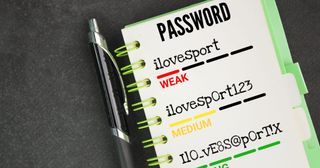
Are you leaving password management up to individual employees? Many cyberattacks start by exploiting weaknesses in password practices—often due to human error or poor internal management. If your company’s password policies are too lax, a single compromised account could lead to a major data breach. In this article, we’ll break down five key strategies IT professionals should implement to strengthen internal password management. From realistic policy setting based on the latest NIST guidelines, to effective tool usage and employee education, we’ll cover practical steps you can take to protect your organization.
In Part 1, we discussed an issue that commonly occurs when migrating to SharePoint Online (SPO): files failing to open when accessed through File Explorer. This problem is often caused by exceeding SPO’s limits on folder depth and file name length. In this article, we’ll focus on how to prevent such issues by using metadata management and adopting more efficient file management practices.
At the Heart of a Project That Feels Like Tokyo Station
In the world of IT projects, we often find ourselves in the middle of an environment where information, people, resources, and decisions constantly intersect. At times, it feels as if we’re standing at the very center of Tokyo Station—a hub where bullet trains, local lines, subways, and countless passengers from all walks of life converge. Just as station controllers ensure travelers reach their destinations smoothly, IT professionals guide the flow of communication, requirements, and decisions to keep projects moving forward.
In business environments, it’s not uncommon to run into situations where a PC doesn’t automatically restart after a Windows update, or remains powered off after a power outage. This can become a real problem, especially for PCs used for remote access or unattended operations like surveillance or server-related tasks. In this article, we’ll walk you through how to configure the BIOS setting on Dell Optiplex PCs (e.g., 7060) so that the system will automatically power on after power is restored.