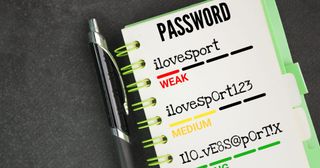
Are you leaving password management up to individual employees? Many cyberattacks start by exploiting weaknesses in password practices—often due to human error or poor internal management. If your company’s password policies are too lax, a single compromised account could lead to a major data breach. In this article, we’ll break down five key strategies IT professionals should implement to strengthen internal password management. From realistic policy setting based on the latest NIST guidelines, to effective tool usage and employee education, we’ll cover practical steps you can take to protect your organization.
“All I wanted was to show part of my screen, but I fumbled with the tools again.” Have you ever had that moment? Taking screenshots is one of the most common tasks in the workplace, but the best method actually depends on your purpose. Here, we compare 3 useful screenshot methods on Windows and explain when each one shines.
“It was working fine yesterday… but for some reason, I can’t connect to the internet today.” If you work in IT support, you’ve likely heard this line more times than you can count. Sudden, unexplained network issues are a common headache. This article shares a real-life case in which a laptop suddenly couldn’t connect via Wi-Fi or wired LAN—along with the specific recovery steps that worked in the end.
One of the most common IT helpdesk tickets is: “My monitor suddenly stopped working…”
Especially in setups with dual monitors and docking stations, the cause is often simple and can be resolved in just a few steps. This article outlines a practical checklist used by IT professionals for resolving monitor display issues quickly and efficiently.
In business environments, it’s not uncommon to run into situations where a PC doesn’t automatically restart after a Windows update, or remains powered off after a power outage. This can become a real problem, especially for PCs used for remote access or unattended operations like surveillance or server-related tasks. In this article, we’ll walk you through how to configure the BIOS setting on Dell Optiplex PCs (e.g., 7060) so that the system will automatically power on after power is restored.
In day-to-day IT support, situations often come up like:
“I normally work with a standard user account, but sometimes I need admin rights to uninstall drivers or access admin web consoles.” Logging off and switching accounts every time is tedious. That’s where the built-in Windows runas command comes in handy. It lets you run programs using an admin account only when needed, without changing your main login.